
SQL Sentry Settings Pane
Introduction
The Settings pane is where settings are configured for instances, sources, and objects. This tab is also where performance counter thresholds are configured when a counter is selected. Settings can be configured globally, at the instance level, or at the object level, and just like conditions, they work on the principle of inheritance. The scope is determined by items selected in the Navigator pane. For more information, see the Conditions pane topic.
Opening the Settings Pane
The Settings pane and Navigator pane are docked on the Start Page of the SQL Sentry client by default. Select the Settings tab to display the settings pane.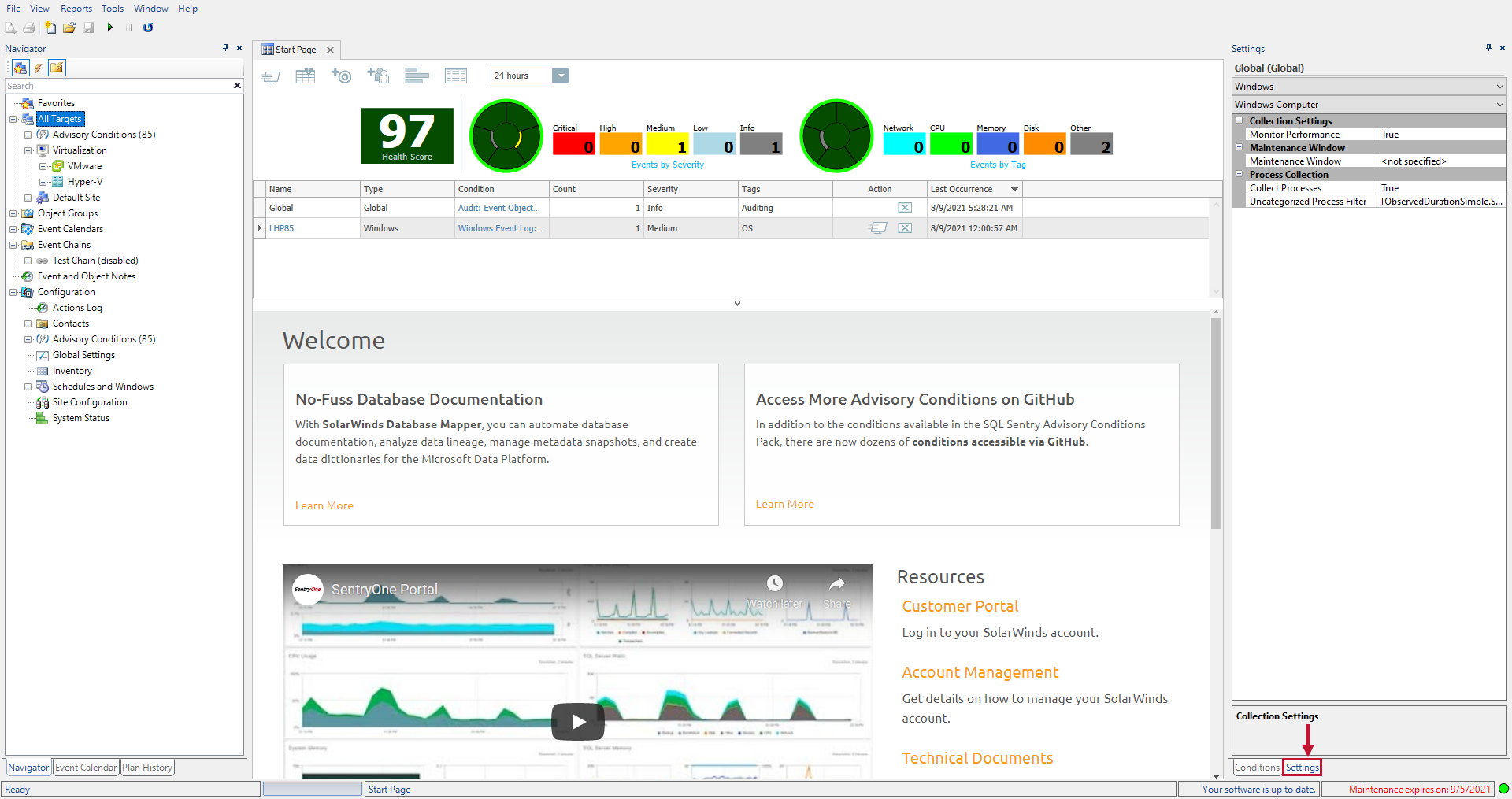
Note: If the Settings pane does not open on your default installation, select View > Settings on the toolbar to display it. Select the desired site, group, target, or instance to begin configuring your settings.

Amazon RDS for SQL Server Instance
The following settings are configurable for Amazon RDS for SQL Server:
 Amazon RDS for SQL Server

Miscellaneous Settings
| Setting | Definition | Level Configurable |
|---|---|---|
| Auto-enable SQL Server Agent Tokens | Whether or not to enable SQL Server Agent Tokens on SQL Server 2005 instances. |
|
| Auto-recycle large SQL Server Agent Logs | Whether or not to automatically recycle large agent log files in SQL Server 2005 or greater. |
|
| Collect Session TempDB Usage | Set to True to turn on data collection for TempDB Usage and populate the TempDB Session Usage table. |
|
| Collect TempDB Object Stats | Set to True to turn on data collection for TempDB Usage and populate the TempDB Object Stats charts. See the Troubleshooting article for more guidance on this setting. |
|
| Maximum Queue Length | The maximum number of objects that can be queued at one time. This setting always applies to the connection level. |
|
| Inherit from Parent (Global) | Specifies whether miscellaneous settings are inherited from the parent object. |
|
Synchronization
| Setting | Definition | Level Configurable |
|---|---|---|
| Max User Databases to Synchronize (largest first) | The maximum number of databases to synchronize, ordered by total size. This includes system databases. |
|
| Max User Database Files to Synchronize ( most active & largest first) | The maximum number of user database files to synchronize (most active & largest first). |
|
| Inherit from Parent (Global) | Specifies whether Synchronization settings are inherited from the parent object. |
|
Maintenance Window
| Setting | Definition | Level Configurable |
|---|---|---|
| Maintenance Window | The maintenance window for watched instances. Only Log actions will be triggered for Failsafe conditions inside the maintenance window. Send, Execute, and other actions will not be triggered. |
|
| Inherit from Parent (Global) | Specifies whether Maintenance Window settings are inherited from the parent object. |
|
Databases Source

General Settings
| Setting | Definition | Level Configurable |
|---|---|---|
| Enable Table/ Index Data Collection | Specifies whether table and index collection is enabled. If disabled no index management functions will be performed. |
|
| Max Partitions to Collect Per Database | The maximum partitions to collect. |
|
| Min Index Size (MB) to Collect Fragmentation Data | The minimum size of the index in MB to be considered for defrag. |
|
| Max Index Size (MB) to Collect Fragmentation Data | The maximum size of the index in MB to be considered for defrag. |
|
| Collect Buffer Data when Buffer >8GB |
Collecting detailed buffer information is inherently a low overhead process. However, since it takes approximately 1 second per GB of buffer, on larger buffers the associated query can take some time to complete, which may cause it to appear in Top SQL and or generate associated alerts. It is generally safe to enable this setting, since SQL Sentry ensures that the total time spent per day collecting buffer data will be roughly the same regardless of buffer size, and that collection only occurs when the buffer has changed. |
|
| Inherit From Parent | Specifies whether the general database source settings are inherited from the parent object. |
|
Deadlocks Source

Synchronization
| Setting | Definition | Level Configurable |
|---|---|---|
| History Filter | The filter used for history synchronization. Only events that meet the filter will be written to the database. |
|
| Inherit from Parent (Global) | Specifies whether the maximum row count settings are inherited from the parent object. |
|
Collection Settings
| Setting | Definition | Level Configurable |
|---|---|---|
| Collect Deadlock Events | Specifies whether the deadlock statement collection is enabled. |
|
| Inherit from Parent (Global) | Specifies whether the deadlock settings are inherited from the parent object. |
|
Index Defragmentation

General Defrag Settings
| Setting | Definition | Level Configurable |
|---|---|---|
| Primary Schedule | The schedule on which index analysis and or defrag will be performed, according to the configured reorg and rebuild thresholds. |
|
| Operation Type | Options for Analyze Only and Analyze & Defrag. See the Fragmentation Manager article for more details. |
|
| Reanalyze Indexes After Defrag | Specifies whether to run the fragmentation analysis again after defrag. |
|
| Fragmentation Scan Mode | The scan mode used when scanning for fragmentation. |
|
| Maximum Concurrent Operations | The maximum concurrent operations to run on a SQL Server Instance. |
|
| Delay Between Defrag Operations | When Maximum Concurrent Operations is set to 1, you can specify a delay between defrag operations to prevent send/redo queue overload when availability groups or mirroring are in use. |
|
| Maximum Duration | The maximum allowed runtime for the defragmentation process. |
|
| Partitions (Enterprise Only) | Which partitions to include for defragmentation. |
|
| Inherit From Parent (Global) | Specifies whether the general database settings are inherited from the parent object. |
|
Index Reorg Settings
| Setting | Definition | Level Configurable |
|---|---|---|
| Reorg Threshold % | The maximum fragmentation percentage before an index reorg is performed. |
|
| Reorg Schedule | Dedicated schedule on which reorgs only will be performed, according to the reorg threshold. Rebuilds will not be performed even if the rebuild threshold has been exceeded. |
|
| Inherit From Parent (Global) | Specifies whether the index reorg settings are inherited from the parent object. |
|
Index Rebuild Settings
| Setting | Definition | Level Configurable |
|---|---|---|
| Rebuild Threshold % | The maximum fragmentation percentage before an index rebuild is performed. |
|
| Rebuild Schedule | Dedicated schedule on which rebuilds only (online or offline) will be performed, according to the rebuild threshold. |
|
| Offline Rebuild Window | If an offline rebuild will be performed as the result of the primary schedule, then only start the offline rebuild during this window. |
|
| Sort in tempdb | Specifies whether to use the tempdb for sorting. |
|
| Use Online Rebuild (Enterprise Only) | Specifies whether to rebuild the index while online (Enterprise Only). |
|
| MAXDOP (Enterprise Only) | The max degree of parallelism to use during the rebuild. |
|
| Inherit From Parent (Global) | Specifies whether the index reorg settings are inherited from the parent object. |
|
Top SQL

Runtime Thresholds
| Setting | Definition | Level Configurable |
|---|---|---|
| Maximum Duration Threshold | The maximum allowed duration for the object. |
|
| Maximum Duration Threshold Percent | The maximum allowed duration percentage for the object. |
|
| Minimum Duration Threshold | The minimum allowed duration for the object. |
|
| Minimum Duration Threshold Percent | The minimum allowed duration percentage for the object. |
|
| Inherit From Parent | Specifies whether the duration thresholds settings are inherited from the parent object. |
|
Top SQL Source

Collection Settings
| Setting | Definition | Level Configurable |
|---|---|---|
| Minimum Duration | The minimum required duration for a statement to be logged. |
|
| Minimum CPU | The minimum required CPU for a statement to be logged. |
|
| Minimum Reads | The minimum reads required for a statement to be logged. |
|
| Minimum Writes | The minimum required writes for a statement to be logged. |
|
| Collect Trace Events | Specifies whether traces events are collected. |
|
| Collect Statement Events | Specifies whether statement events are collected. |
|
| Running Events Polling Interval | Specifies how often the service checks for running events. |
|
| Collect Execution Plans | Specifies whether execution plans are collected. Running queries will not be captured if this is set to false. |
|
| Max Plan Size to Collect (MB) | Specifies the max plan size to collect in MB. |
|
| Collect Query Stats | Specifies whether query stats collection is enabled. |
|
| Query Stats Sample Interval | Specifies how often to sample query stats. |
|
| Filter Time Span | The Filter Time Span specifies the base length of time over which the collection filters will be applied to Query Stats. See Filter Factor for more details. |
|
| Filter Factor | The Filter Factor is calculated by dividing the Query Stats Sample Interval by the Filter Time Span. The collection filters such as Minimum Duration are multiplied by this value when applied to Query Stats collection. For example, using the defaults (Query Stats Sample Interval = 60 Seconds, Filter Time Span = 30 Seconds, Minimum Duration = 5 Seconds) the total cumulative duration of all executions of a query over the 60 second sample interval must be greater than 10 seconds. |
|
| Inherit From Parent (Global) | Specifies whether the Top SQL settings are inherited from the parent object. |
|
| AI Query Assist Enabled | Determines whether AI Query Assist is enabled or disabled. This setting must be set to True for AI Query Assist to be enabled. |
|
Analytics Platform System Instance
The following settings are configurable for Analytics Platform System instances:
Analytics Platform System

Collection Settings
| Setting | Definition | Level Configurable |
|---|---|---|
| Monitor Performance | Controls whether performance monitoring is enabled. | Global Site/Group Target |
| Inherit From Parent (Global) | Specifies whether collection settings are inherited from the parent object. | Site/Group Target |
Maintenance Window
| Setting | Definition | Level Configurable |
|---|---|---|
| Maintenance Window |
The maintenance window for targets. Only Log actions will be triggered for Failsafe conditions inside the maintenance window. Send, Execute, and other actions will not be triggered. |
|
| Inherit From Parent (Global) | Specifies whether maintenance window settings are inherited from the parent object. |
|
APS Distributed Queries

Runtime Thresholds
| Setting | Definition | Level Configurable |
|---|---|---|
| Maximum Duration Threshold | The maximum allowed duration for the object. |
|
| Minimum Duration Threshold | The minimum allowed duration for the object. |
|
| Inherit From Parent (Global) | Specifies whether the duration threshold settings are inherited from the parent object. |
|
APS Distributed Queries Source

Queries Settings
| Setting | Definition | Level Configurable |
|---|---|---|
| Minimum Duration | The minimum required duration for a statement to be logged. |
|
| SQL Request Plan Collection Enabled | This will enable collection of compute node level execution plans. |
|
| Collect Distributed Queries Errors | This will collect and show errors for distributed queries. |
|
| Inherit From Parent (Global) | Specifies whether the Top SQL Settings are inherited from the parent object. |
|
APS Health Alerts Source

Synchronization
| Setting | Definition | Level Configurable |
|---|---|---|
| History Filter | The filter used for history synchronization. Only events that meet the filter will be written to the database. |
|
| Inherit From Parent (Global) | Specifies whether the maximum row count settings are inherited from the parent object. |
|
APS Loader Backup Run

Runtime Thresholds
| Setting | Definition | Level Configurable |
|---|---|---|
| Maximum Duration Threshold | The maximum allowed duration for the object. |
|
| Maximum Duration Threshold Percent | The maximum allowed duration percentage for the object. |
|
| Minimum Duration Threshold | The minimum allowed duration for the object. |
|
| Minimum Duration Threshold Percent | The minimum allowed duration percentage for the object. |
|
| Inherit From Parent (Global) | Specifies whether the duration threshold settings are inherited from the parent object. |
|
Azure SQL Data Warehouse Instance
The following settings are configurable for Azure SQL Data Warehouse instances:
Azure SQL Data Warehouse

Collection Settings
| Setting | Definition | Level Configurable |
|---|---|---|
| Monitor Performance | Controls whether performance monitoring is enabled. |
|
| Inherit From Parent (Global) | Specifies whether collection settings are inherited from the parent object. |
|
Maintenance Window
| Setting | Definition | Level Configurable |
|---|---|---|
| Maintenance Window | The maintenance window for targets. Only Log actions will be triggered for Failsafe conditions inside the maintenance window. Send, Execute, and other actions will not be triggered. |
|
| Inherit From Parent (Global) | Specifies whether maintenance window settings are inherited from the parent object. |
|
Azure SQL Data Warehouse Distributed Queries

Runtime Thresholds
| Setting | Definition | Level Configurable |
|---|---|---|
| Maximum Duration Threshold | The maximum allowed duration for the object. |
|
| Minimum Duration Threshold | The minimum allowed duration percentage for the object. |
|
| Inherit From Parent (Global) | Specifies whether the duration threshold settings are inherited from the parent object. |
|
Azure SQL Data Warehouse Distributed Queries Source

Queries Settings
| Setting | Definition | Level Configurable |
|---|---|---|
| Minimum Duration | The minimum required duration for a statement to be logged. |
|
| SQL Request Plan Collection Enabled | This will enable collection of compute node level execution plans. |
|
| Collect Distributed Queries Errors | This will collect and show errors for distributed queries. |
|
| Inherit From Parent (Global) | Specifies whether the Top SQL settings are inherited from the parent object. |
|
Azure SQL Data Warehouse Loader Backup Run

Runtime Thresholds
| Setting | Definition | Level Configurable |
|---|---|---|
| Maximum Duration Threshold | The maximum allowed duration for the object. |
|
| Maximum Duration Threshold Percent | The maximum allowed duration percentage for the object. |
|
| Minimum Duration Threshold | The minimum allowed duration for the object. |
|
| Minimum Duration Threshold Percent | The minimum allowed duration percentage for the object. |
|
| Inherit From Parent (Global) | Specifies whether the duration threshold settings are inherited from the parent object. |
|
Azure SQL Database Instance
The following settings are configurable for Azure SQL Database instances:
Azure SQL Database

Miscellaneous
| Setting | Definition | Level Configurable |
|---|---|---|
| Allow SQL Sentry monitoring objects in target | In order to provide the best experience, some features of monitoring an Azure SQL Database require a few small tables and procedures to be stored in the target database. These objects will be created and maintained in a SQL Sentry schema. If you choose to not allow the monitoring objects to be created, the features dependent upon them will be disabled for the target database. Additional Information: See the Watched Target Objects article for a complete list of database objects that are placed on the watched target. |
|
| Collect Session TempDB Usage | Set to True to turn on data collection for TempDB Usage and populate the TempDB Session Usage table. |
|
| Collect TempDB Object Stats | Set to True to turn on data collection for TempDB Usage and populate the TempDB Object Stats charts. See the Troubleshooting article for more guidance on this setting. |
|
| Inherit From Parent | Specifies whether miscellaneous settings are inherited from the parent object. |
|
Collection Settings
| Setting | Definition | Level Configurable |
|---|---|---|
| Monitor Performance | Controls whether performance monitoring is enabled. |
|
| Inherit From Parent (Global) | Specifies whether collection settings are inherited from the parent object. |
|
Maintenance Window
| Setting | Definition | Level Configurable |
|---|---|---|
| Maintenance Window | The maintenance window for targets. Only Log actions will be triggered for Failsafe conditions inside the maintenance window. Send, Execute, and other actions will not be triggered. |
|
| Inherit From Parent (Global) | Specifies whether maintenance window settings are inherited from the parent object. |
|
Blocking SQL

Runtime Thresholds
| Setting | Definition | Level Configurable |
|---|---|---|
| Maximum Duration Threshold | The maximum allowed duration for the object. |
|
| Inherit From Parent (Global) | Specifies whether the duration threshold settings are inherited from the parent object. |
|
Blocking SQL Source

Collection Settings
| Setting | Definition | Level Configurable |
|---|---|---|
| Minimum Block Duration | The time required to trigger a block condition. |
|
| Inherit From Parent (Global) | Specifies whether the blocking settings are inherited from the parent object. |
|
Top SQL

Runtime Thresholds
| Setting | Definition | Level Configurable |
|---|---|---|
| Maximum Duration Threshold | The maximum allowed duration for the object. |
|
| Maximum Duration Threshold Percent | The maximum allowed duration percentage for the object. |
|
| Minimum Duration Threshold | The minimum allowed duration for the object. |
|
| Minimum Duration Threshold Percent | The minimum allowed duration percentage for the object. |
|
| Inherit From Parent (Global) | Specifies whether the duration threshold settings are inherited from the parent object. |
|
Top SQL Source

Collection Settings
| Setting | Definition | Level Configurable |
|---|---|---|
| Minimum Duration | The minimum duration required for a statement to be logged. |
|
| Minimum CPU | The minimum CPU required for a statement to be logged. |
|
| Minimum Reads | The minimum required reads for a statement to be logged. |
|
| Minimum Writes | The minimum required writes for a statement to be logged. |
|
| Collect Trace Events | Specifies whether trace events are collected. |
|
| Collect Statement Events | Specifies whether statement events are collected. |
|
| Running Events Polling Interval | Specifies how often the service checks for running events. |
|
| Collect Execution Plans | Specifies whether execution plans are collected. Running queries will not be captured if set to false. |
|
| Max Plan Size to Collect (MB) | Specifies the max plan size to collect in MB. |
|
| Collect Query Stats | Specifies whether query stats collection is enabled. |
|
| Query Stats Sample Interval | Specifies how often to sample query stats. |
|
| Filter Time Span | Specifies the base length of time over which the collection filters will be applied to Query Stats. See Filter Factor for more details. |
|
| Filter Factor | The Filter Factor is calculated by dividing the Query Stats Sample Interval by the Filter Time Span. The collection filters such as Minimum Duration are multiplied by this value when applied to Query Stats collection. For example, using the defaults (Query Stats Sample Interval = 60 Seconds, Filter Time Span = 30 Seconds, Minimum Duration = 5 Seconds) the total cumulative duration of all executions of a query over the 60 second sample interval must be greater than 10 seconds. |
|
| Inherit From Parent (Azure DB) | Specifies whether the Top SQL settings are inherited from the parent object. |
|
| AI Query Assist Enabled | Determines whether AI Query Assist is enabled or disabled. This setting must be set to True for AI Query Assist to be enabled. |
|
Event Chain
The following settings are configurable for Event Chains:
Event Chain
| Setting | Definition | Level Configurable |
|---|---|---|
| Maximum Runtime Threshold | The maximum allowed runtime for the chain. |
|
| Minimum Runtime Threshold | The minimum allowed runtime for the chain. |
|
Event Chain Node
The following settings are configurable for Event Chain Nodes:
Event Chain Node
| Setting | Definition | Level Configurable |
|---|---|---|
| Maximum Runtime Threshold | The maximum allowed runtime for the chain node. |
|
| Minimum Runtime Threshold | The minimum allowed runtime for the chain node. |
|
SQL Server (Instance)
The following settings are configurable for SQL Server:
SQL Server

Miscellaneous
| Setting | Definition | Level Configurable |
|---|---|---|
| Auto-enable SQL Server Agent Tokens | Whether or not to enable SQL Server Agent Tokens on SQL Server 2005 instances. Important: On SQL Server 2005 and above, SQL Server Agent tokens are disabled as a security measure. They must be enabled to allow SQL Sentry to watch alerts on these servers. Selecting True allows SQL Sentry to automatically enable these tokens when an alert is watched on a 2005 and above server. Additional Information: For more information about SQL Server Agent Tokens, see SQL Server Books Online. |
|
| Auto-recycle large SQL Server Agent Logs | Whether or not to automatically recycle large agent log files in SQL Server 2005 or greater. |
|
| Collect Session TempDB Usage | Set to True to turn on data collection for TempDB Usage and populate the TempDB Session Usage table. |
|
| Collect TempDB Object Stats | Set to True to turn on data collection for TempDB Usage and populate the TempDB Object Stats charts. See the Troubleshooting article for more guidance on this setting. |
|
| Maximum Queue Length |
This setting specifies the maximum number of jobs that can be queued at one time on this server. For more information, see the Job Queuing topic. This setting is used to provide more detail than the basic cleaner memory data, but it is higher overhead to collect. Use caution when enabling this setting to ensure it doesn't impact performance. The default value for this setting is False. Note: The default value for this setting is 5. |
|
| Inherit From Parent | Specifies whether miscellaneous settings are inherited from the parent object. |
|
Synchronization
| Setting | Definition | Level Configurable |
|---|---|---|
| Max User Databases to Synchronize (largest first) | The maximum number of databases to synchronize, ordered by total size. This includes system databases. |
|
| Max User Database Files to Synchronize (most active & largest first) | The maximum number of user database files to synchronize (most active & largest first). |
|
| Inherit From Parent (Global) | Specifies whether synchronization settings are inherited from the parent object. |
|
Maintenance Window
| Setting | Definition | Level Configurable |
|---|---|---|
| Maintenance Window | The maintenance window for targets. Only Log actions will be triggered for Failsafe conditions inside the maintenance window. Send, Execute, and other actions will not be triggered. |
|
| Inherit From Parent (Global) | Specifies whether maintenance window settings are inherited from the parent object. |
|
Blocking SQL

Runtime Thresholds
| Setting | Definition | Level Configurable |
|---|---|---|
| Maximum Duration Threshold | The maximum allowed duration for the object. |
|
| Inherit From Parent | Specifies whether the duration threshold settings are inherited from the parent object. |
|
Blocking SQL Source

Runtime Thresholds
| Setting | Definition | Level Configurable |
|---|---|---|
| Minimum Block Duration | The time required to trigger a block condition. |
|
| Inherit From Parent | Specifies whether the blocking settings are inherited from the parent object. |
|
Databases Source

General Settings
| Setting | Definition | Level Configurable |
|---|---|---|
| Enable Table/ Index Data Collection | Specifies whether table and index collection is enabled. If disabled no index management functions will be performed. |
|
| Max Partitions to Collect per Database | The maximum partitions to collect. |
|
| Min Index Size (MB) to Collect Fragmentation Data | The minimum size of the index in MB to be considered for defrag. |
|
| Max Index Size (MB) to Collect Fragmentation Data | The maximum size of the index in MB to be considered for defrag. |
|
| Collect Buffer Data when Buffer > 8GB | Collecting detailed buffer information is inherently a low overhead process. However, since it takes approximately 1 second per GB of buffer, on larger buffers the associated query can take some time to complete, which may cause it to appear in Top SQL and or generate associated alerts. It is generally safe to enable this setting, since SQL Sentry ensures that the total time spent per day collecting buffer data will be roughly the same regardless of buffer size, and that collection only occurs when the buffer has changed. |
|
| Inherit From Parent | Specifies whether the general database source settings are inherited from the parent object. |
|
Deadlocks Source

Synchronization
| Setting | Definition | Level Configurable |
|---|---|---|
| History Filter | The filter used for history synchronization. Only events that meet the filter will be written to the database. |
|
| Inherit From Parent (Global) | Specifies whether the maximum row count settings are inherited from the parent object. |
|
Collection Settings
| Setting | Definition | Level Configurable |
|---|---|---|
| Collect Deadlock Events | Specifies whether the deadlock statement collection is enabled. |
|
| Inherit From Parent (Global) | Specifies whether the deadlock settings are inherited from the parent object. |
|
Index Defragmentation

General Defrag Settings
| Setting | Definition | Level Configurable |
|---|---|---|
| Primary Schedule | The schedule on which index analysis and/or defrag will be performed, according to the configured reorg and rebuild thresholds. |
|
| Operation Type | Options for Analyze Only and Analyze & Defrag. See the Fragmentation Manager article for more details. |
|
| Reanalyze Indexes After Defrag | Specifies whether to run the fragmentation analysis after defrag. |
|
| Fragmentation Scan Mode | The scan mode used when scanning for fragmentation. |
|
| Maximum Concurrent Operations | The maximum concurrent operations to run on a SQL Server Instance. |
|
| Delay Between Defrag Operations | When Maximum Concurrent Operations is set to 1, you can specify a delay between defrag operations to prevent send/redo queue overload when availability groups or mirroring are in use. |
|
| Maximum Duration | The maximum allowed runtime for the defragmentation process. |
|
| Partitions (Enterprise Only) | Which partitions to include for defragmentation. |
|
| Inherit From Parent | Specifies whether the general database settings are inherited from the parent object. |
|
Index Reorg Settings
| Setting | Definition | Level Configurable |
|---|---|---|
| Reorg Threshold % | The maximum fragmentation percentage before an index reorg is performed. | Global Site/Group Target |
| Reorg Schedule | Dedicated schedule on which reorgs only will be performed, according to the reorg threshold. Rebuilds will not be performed even if the rebuild threshold has been exceeded. | Global Site/Group Target |
| Inherit From Parent (Global) | Specifies whether the index reorg setting are inherited from the parent object. | Site/Group Target |
Index Rebuild Settings
| Setting | Definition | Level Configurable |
|---|---|---|
| Rebuild Threshold % | The maximum fragmentation percentage before an index rebuild is performed. |
|
| Rebuild Schedule | Dedicated schedule on which rebuilds only (online or offline) will be performed, according to the rebuild threshold. |
|
| Offline Rebuild Window | If an offline rebuild will be performed as the result of the primary schedule, then only start the offline rebuild during this window. |
|
| Sort in tempdb | Specifies whether to use tempdb for sorting. |
|
| Use Online Rebuild (Enterprise Only) | Specifies whether to rebuild the index while online (Enterprise Only). |
|
| MAXDOP (Enterprise Only) | The max degree of parallelism to use during the rebuild. |
|
| Inherit From Parent (Global) | Specifies whether the index reorg settings are inherited from the parent object. |
|
Maintenance Plans Source

General
| Setting | Definition | Level Configurable |
|---|---|---|
| Auto-watch New Objects | Whether or not new objects will be set to watched when they are discovered. |
|
| Inherit From Parent (Global) | Specifies whether general settings are inherited from the parent object. |
|
Synchronization
| Setting | Definition | Level Configurable |
|---|---|---|
| Maximum Rows to Synchronize | The maximum rows of historical event data to collect from this source. This settings is most applicable to the initial loading process, since subsequent synchronizations will only include new records. Use care when increasing this value – If it is set too high database content can result. |
|
| Inherit From Parent (Global) | Specifies whether the maximum row count settings are inherited from the parent object. |
|
Reporting Services Report

Runtime Thresholds
| Setting | Definition | Level Configurable |
|---|---|---|
| Maximum Runtime Threshold | The maximum allowed duration for the object. |
|
| Maximum Runtime Threshold Percent | The maximum allowed duration percentage for the object. See the warning below. Note: The default value is 250. This means that any time a job runs for less than 10 (default Minimum Runtime Threshold Percent) or longer than 250 percent of its average runtime, a notification is sent. If too many messages are being received, these settings can be adjusted as needed. |
|
| Minimum Runtime Threshold | The minimum allowed duration for the object. |
|
| Minimum Runtime Threshold Percent | The minimum allowed duration percentage for the object. Note: The default value is 10. |
|
| Inherit From Parent (Global) | Specifies whether the runtime threshold settings are inherited from the parent object. |
|
Important: For the Maximum Runtime Threshold Percent setting, in cases where the average runtime for a job is less than 30 seconds, a maximum allowed runtime value of two minutes is used regardless of the Maximum Runtime Threshold Percent setting value.
If you wish to avoid this, you can do either of the following:
- Use the Maximum Runtime Threshold setting rather than Maximum Runtime Threshold Percent setting.
- Use a Response Ruleset for the SQL Server Agent Job: Runtime Threshold Max condition that delays alerting until the jobs have run for a duration the user defines.
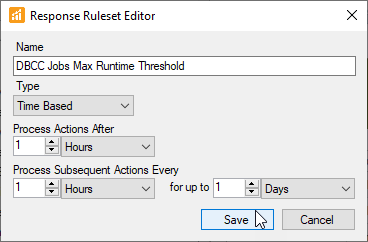
Explicit time-based thresholds can also be specified. Any time an explicit time-based threshold is specified it overrides the percentage-based thresholds for that object. Time-based thresholds are usually less valuable at the global level, particularly the Minimum Runtime Threshold that doesn't have much value globally. Explicit runtime thresholds tend to be more applicable at the actual instance or object level for overriding the global percentage thresholds on a case-by-case basis.
Reporting Services Reports Source

General
| Setting | Definition | Level Configurable |
|---|---|---|
| Auto-watch New Objects | Whether or not new objects will be set to watched when they are discovered. |
|
| Inherit From Parent (Global) | Specifies whether general settings are inherited from the parent object. |
|
Synchronization
| Setting | Definition | Level Configurable |
|---|---|---|
| Maximum Rows to Synchronize | The maximum rows of historical event data to collect from this source. This settings is most applicable to the initial loading process, since subsequent synchronizations will only include new records. Use care when increasing this value – If it is set too high database content can result. Note: The default is 5000. |
|
| History Filter | The filter used for history synchronization. Only events that meet the filter will be written to the database. |
|
| Inherit From Parent (Global) | Specifies whether the maximum row count settings are inherited from the parent object. |
|
SQL Agent Alerts Source

General
| Setting | Definition | Level Configurable |
|---|---|---|
| Auto-watch New Objects | Whether or not new objects will be set to watched when they are discovered. |
|
| Inherit From Parent (Global) | Specifies whether general settings are inherited from the parent object. |
|
Synchronization
| Setting | Definition | Level Configurable |
|---|---|---|
| Maximum Rows to Synchronize | The maximum rows of historical event data to collect from this source. This settings is most applicable to the initial loading process, since subsequent synchronizations will only include new records. Use care when increasing this value – If it is set too high database content can result. |
|
| History Filter | The filter used for history synchronization. Only events that meet the filter will be written to the database. |
|
| Inherit From Parent | Specifies whether the maximum row count settings are inherited from the parent object. |
|
SQL Server Agent Job

Runtime Thresholds
| Setting | Definition | Level Configurable |
|---|---|---|
| Maximum Duration Threshold | The maximum allowed duration for the object. |
|
| Maximum Duration Threshold Percent | The maximum allowed duration percentage for the object. |
|
| Minimum Duration Threshold | The minimum allowed duration for the object. |
|
| Minimum Duration Threshold Percent | The minimum allowed duration percentage for the object. |
|
| Inherit From Parent (Global) | Specifies whether the runtime threshold settings are inherited from the parent object. |
|
Behavior when Queuing Other Jobs
| Setting | Definition | Level Configurable |
|---|---|---|
| Queue Other For Up To | The maximum length of time this job will queue other jobs. |
|
| Auto-Start Threshold | Any job whose next scheduled run time is beyond the specified threshold will be started automatically upon leaving the queue. If a job’s next scheduled run time is before the threshold it will not auto-start. |
|
| Inherit From Parent (Global) | Specifies whether the queuing behavior is inherited from the parent object. |
|
Behavior When This Job is Queued
| Setting | Definition | Level Configurable |
|---|---|---|
| Queue Type | The behavior when this job is queued. |
|
| Queue For Up To | The maximum length of time this job can be queued. |
|
| Auto-Start Type | Controls the auto-start behavior for the job when it leaves the queue. “Use default setting” will cause the queuing job’s “Auto-Start Threshold” setting to be used. |
|
| Inherit From Parent (Global) | Specifies whether the behavior when queued is inherited from the parent object. |
|
SQL Server Agent Jobs Source

General
| Setting | Definition | Level Configurable |
|---|---|---|
| Auto-watch New Objects | Whether or not new objects will be set to watched when they are discovered. |
|
| Missed Run Threshold | The length of time that must pass before an object run is considered to be missed. |
|
| Inherit From Parent (Global) | Specifies whether general settings are inherited from the parent object. |
|
Synchronization
| Setting | Definition | Level Configurable |
|---|---|---|
| Maximum Rows to Synchronize | The maximum rows of historical event data to collect from this source. This settings is most applicable to the initial loading process, since subsequent synchronizations will only include new records. Use care when increasing this value – If it is set too high database content can result. |
|
| Inherit From Parent (Global) | Specifies whether the maximum row count settings are inherited from the parent object. |
|
SQL Server Agent Log Source

General
| Setting | Definition | Level Configurable |
|---|---|---|
| Auto-watch New Objects | Whether or not new objects will be set to watched when they are discovered. | Global Site/Group Target |
| Inherit From Parent (Global) | Specifies whether general settings are inherited from the parent object. | Site/Group Target |
Synchronization
| Setting | Definition | Level Configurable |
|---|---|---|
| Maximum Rows to Synchronize | The maximum rows of historical event data to collect from this source. This settings is most applicable to the initial loading process, since subsequent synchronizations will only include new records. Use care when increasing this value – If it is set too high database content can result. |
|
| History Filter | The filter used for history synchronization. Only events that meet the filter will be written to the database. |
|
| Inherit From Parent (Global) | Specifies whether the maximum row count settings are inherited from the parent object. |
|
Top SQL

Runtime Thresholds
| Setting | Definition | Level Configurable |
|---|---|---|
| Maximum Duration Threshold | The maximum allowed duration for the object. |
|
| Maximum Duration Threshold Percent | The maximum allowed duration percentage for the object. |
|
| Minimum Duration Threshold | The minimum allowed duration for the object. |
|
| Minimum Duration Threshold Percent | The minimum allowed duration percentage for the object. |
|
| Inherit From Parent | Specifies whether the duration threshold settings are inherited from the parent object. |
|
Top SQL Source

Collection Settings
| Setting | Definition | Level Configurable |
|---|---|---|
| Minimum Duration | The minimum required duration for a statement to be logged. |
|
| Minimum CPU | The minimum required CPU for a statement to be logged. |
|
| Minimum Reads | The minimum required reads for a statement to be logged. |
|
| Minimum Writes | The minimum required writes for a statement to be logged. |
|
| Collect Trace Events | Specifies whether trace events are collected. |
|
| Collect Statement Events | Specifies whether statement events are collected. Warning: On systems with very high transaction volumes that also make extensive use of scalar functions or Table-Valued Parameters, enabling Collect Statement Events may cause a negative impact on the performance of the monitored target, regardless of the effective Top SQL Filter settings or the number of events actually collected. For more information, see Improve SQL Sever Scalar UDF Performance in SQL Server 2019, Four Ways to improve Scalar function performance in SQL Server, Understand the Performance Behavior of SQL Server Scalar User Defined Functions, and SQL Server TVP Performance Gotchas. |
|
| Running Events Polling Interval | Specifies how often the service checks for running events. |
|
| Collect Execution Plans | Specifies whether execution plans are collected. Running queries will not be captured if this setting is set to false. |
|
| Max Plan Size to Collect (MB) | Specifies the max plan size to collect in MB. |
|
| Collect Query Stats | Specifies whether query stats collection is enabled. |
|
| Query Stats Sample Interval | Specifies how often to sample query stats. |
|
| Filter Time Span | Specifies the base length of time over which the collection filters will be applied to Query Stats. See Filter Factor for more details. |
|
| Filter Factor | The Filter Factor is calculated by dividing the Query Stats Sample Interval by the Filter Time Span. The collection filters such as Minimum Duration are multiplied by this value when applied to Query Stats collection. For example, using the defaults (Query Stats Sample Interval = 60 Seconds, Filter Time Span = 30 Seconds, Minimum Duration = 5 Seconds) the total cumulative duration of all executions of a query over the 60 second sample interval must be greater than 10 seconds. |
|
| Inherit From Parent | Specifies whether Top SQL Settings are inherited from the parent object. |
|
| AI Query Assist Enabled | Determines whether AI Query Assist is enabled or disabled. This setting must be set to True for AI Query Assist to be enabled. |
|
SQL Server Analysis Services (Instance)
The following settings are configurable for SQL Server Analysis services:
Analysis Services

Miscellaneous
| Setting | Definition | Level Configurable |
|---|---|---|
| Collect Memory by Category Data | Memory by Category data provides more detail than the basic Cleaner memory data, but is higher overhead to collect. Use caution when enabling to ensure it does not impact performance. |
|
| Inherit From Parent | Specifies whether miscellaneous settings are inherited from the parent object. |
|
Maintenance Window
| Setting | Definition | Level Configurable |
|---|---|---|
| Maintenance Window | The maintenance window for watched instances. Only Log actions will be triggered for Failsafe conditions inside the maintenance window. Send, Execute, and other actions will not be triggered. |
|
| Inherit From Parent (Global) | Specifies whether maintenance window settings are inherited from the parent object. |
|
Top Commands

Runtime Thresholds
| Setting | Definition | Level Configurable |
|---|---|---|
| Maximum Duration Threshold | The maximum allowed duration for the object. |
|
| Inherit From Parent (Global) | Specifies whether the duration threshold settings are inherited from the parent object. |
|
Top Commands Source

Collection Settings
| Setting | Definition | Level Configurable |
|---|---|---|
| Minimum Duration | The minimum required duration for a statement to be logged. |
|
| Collect MDX/DAX/DMX/XMLA Events | Specifies whether the command collection is enabled. |
|
| Collect DAX Query Plan Events | Specifies whether DAX Query Plan events are captured. Note that collecting query plans for complex DAX queries can have a negative impact on performance and should only be enabled for troubleshooting purposes. |
|
| Inherit From Parent | Specifies whether the SSAS settings are inherited from the parent object. |
|
Tintri
The following settings are configurable for Tintri:
Tintri VMstore

Collection Settings
| Setting | Definition | Level Configurable |
|---|---|---|
| Monitor Performance | Controls whether performance monitoring is enabled. |
|
Maintenance Window
| Setting | Definition | Level Configurable |
|---|---|---|
| Maintenance Window | The maintenance window for targets. Only Log actions will be triggered for Failsafe conditions inside the maintenance window. Send, Execute, and other actions will not be triggered. |
|
VMware
The following settings are configurable for VMware:
VMware Host

Collection Settings
| Setting | Definition | Level Configurable |
|---|---|---|
| Monitor Performance | Controls whether performance monitoring is enabled. | Global Site/Group Target |
Maintenance Window
| Setting | Definition | Level Configurable |
|---|---|---|
| Maintenance Window | The maintenance window for targets. Only Log actions will be triggered for Failsafe conditions inside the maintenance window. Send, Execute, and other actions will not be triggered. | Global Site/Group Target |
Windows
The following settings are configurable for Windows:
Windows Computer

Collection Settings
| Setting | Definition | Level Configurable |
|---|---|---|
| Monitor Performance | Controls whether performance monitoring is enabled. |
|
| Inherit From Parent (Global) | Specifies whether collection settings are inherited from the parent object. |
|
Maintenance Window
| Setting | Definition | Level Configurable |
|---|---|---|
| Maintenance Window | The maintenance window for targets. Only Log actions will be triggered for Failsafe conditions inside the maintenance window. Send, Execute, and other actions will not be triggered. |
|
| Inherit From Parent (Global) | Specifies whether maintenance window settings are inherited from the parent object. |
|
Process Collection
| Setting | Definition | Level Configurable |
|---|---|---|
| Collect Processes | Specifies whether process collection is enabled. |
|
| Uncategorized Process Filter | The filter controls which uncategorized processes are collected. Categorized or well-known processes are always collected. Once a process has passed the filter, it will continue to be collected until it completes. |
|
| Inherit From Parent | Specifies whether process collection settings are inherited from the parent object. |
|
Windows Event Logs Source

General
| Setting | Definition | Level Configurable |
|---|---|---|
| Auto-watch New Objects | Whether or not new objects will be set to watched when they are discovered. |
|
| Inherit From Parent (Global) | Specifies whether general settings are inherited from the parent object. |
|
Synchronization
| Setting | Definition | Level Configurable |
|---|---|---|
| Maximum Rows to Synchronize | The maximum rows of historical event data to collect from this source. This setting is most applicable to the initial load process, since subsequent synchronizations will only include new records. Use care when increasing this value – if it is set too high database contention can result. |
|
| History Filter | The filter used for history synchronization. Only events that meet the filter will be written to the database. |
|
| Inherit From Parent (Global) | Specifies whether the maximum row count settings are inherited from the parent object. |
|
Windows Task

Runtime Thresholds
| Setting | Definition | Level Configurable |
|---|---|---|
| Maximum Runtime Threshold | The maximum allowed duration for the object. |
|
| Maximum Runtime Threshold Percent | The maximum allowed duration percentage for the object. |
|
| Minimum Runtime Threshold | The minimum allowed duration for the object. |
|
| Minimum Runtime Threshold Percent | The minimum allowed duration percentage for the object. |
|
| Inherit From Parent (Global) | Specifies whether the runtime threshold settings are inherited from the parent object. |
|
Windows Task Source

General
| Setting | Definition | Level Configurable |
|---|---|---|
| Auto-watch New Objects | Whether or not new objects will be set to watched when they are discovered. |
|
| Inherit From Parent (Global) | Specifies whether general settings are inherited from the parent object. |
|
Synchronization
| Setting | Definition | Level Configurable |
|---|---|---|
| Maximum Rows to Synchronize | The maximum rows of historical event data to collect from this source. This settings is most applicable to the initial load process, since subsequent synchronizations will only include new records. Use care when increasing this value – if it is set too high database contention can result. |
|
| Inherit From Parent (Global) | Specifies whether the maximum row count settings are inherited from the parent object. |
|
Performance Counter Settings
The Performance Counter settings screen is used to set the minimum and maximum values for the counter thresholds of that particular counter. These are used to trigger the Performance Counter: Threshold Min and Max conditions if any conditions are enabled for them. This option is only available when selecting a specific performance counter from the Navigator pane. The following settings are configurable for Performance Counters:
Counter Thresholds

| Setting | Definition | Level Configurable |
|---|---|---|
| Maximum | Maximum performance counter threshold. |
|
|
Minimum |
Minimum performance counter threshold. |
|