
About the template and application monitor relationship
In SAM, an application is a group of component monitors inherited from a template when you assign the template to a node. A component monitor queries for values returned by a process, counter, status, or script. SAM uses received data to display vital statistics concerning the health of the system.
SAM application monitor templates provide blueprints for the applications to be monitored. You can customize templates, and use only the component monitors you need to monitor a specific environment. SAM provides several types of templates:
-
AppInsight applications are predefined templates that provide detailed information about business-critical Active Directory, Exchange, Microsoft IIS, or Microsoft SQL instances. Each AppInsight template is specifically designed to discover and monitor elements of an application dynamically.
-
If you have other business-critical applications, apply one of the other templates included in SAM, as listed in the SAM Application Monitor Template Reference. SolarWinds recommends deploying a single template, customizing it for your environment, and then deploying the edited template on all similar applications. You can also obtain templates in THWACK.
-
For proprietary applications that you need to monitor, you can build custom templates.
SAM API Poller templates are also available.
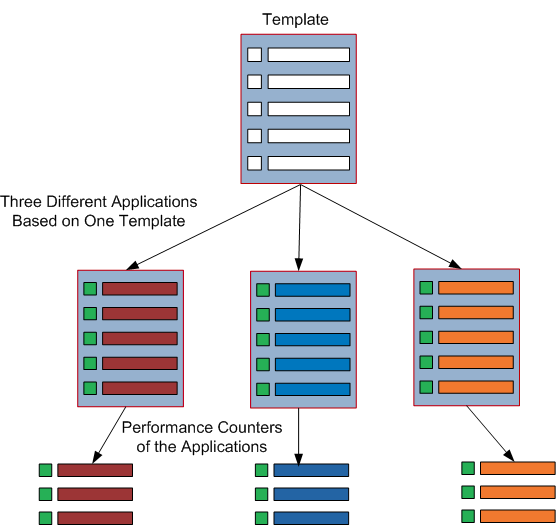
The following illustration shows how SAM application monitor templates and application monitors relate, including AppInsight templates.

If you make a change at the template level, application monitors based on that template are affected. Conversely, if you make a change at the application monitor level, only the individual application is affected.
This inheritance relationship is beneficial if you need to make a lot of changes. For example, rather than making one change to 100 applications (and therefore 100 changes), you can change the parent template once and that change is inherited by all application monitors based on that template.
If you go one level deeper and edit a component monitor in an application monitor, the change only impacts the application monitor, not the original template. If you change thresholds at the component monitor level, only thresholds of the individual component monitor are affected. Thresholds on the parent template, or other application monitors based on the parent template, are not impacted.
Note that many application monitors include an Override Template option for various settings so you can block the inheritance of settings from the original template. Any future changes to a component setting made at the template level will not affect that node's component setting for that application.
