
Scale your VMAN Orion deployment
If you're using VMAN Orion polling, in order to scale your VMAN deployment, you need to scale your SolarWinds Platform deployment. If you're not sure, find out which type of polling your VMAN environment is using and why it matters.
Scaling your deployment of VMAN in the SolarWinds Platform is different from scaling a VMAN appliance installation, so if you still use the legacy VMAN appliance for polling and haven't switched to VMAN Orion polling, see Scaling your VMAN appliance installation.
When you scale your VMa SolarWinds Platform deployment, you'll do two things:
- Increase the system specifications of your main VMAN Orion server to match your deployment size
- Set up Additional Polling Engines to help distribute monitoring workload
If you have multiple SolarWinds products installed onto your main Orion server, see the SolarWinds Platform multi-module system guidelines for more information about recommended requirements for various deployment sizes.
Increase the system specifications of the main VMAN Orion server
As your VMAN environment grows, the load on your main server increases. Adding Additional Polling Engines to your deployment will help handle the increased monitoring load, but that monitored information still needs to be processed by your main Orion server.
To help your main Orion server keep up with the additional processing load, you should upgrade it as your environment grows. In general, your Orion server should:
- Meet the basic requirements for a VMAN and the SolarWinds Platform installation.
- Increase in memory as the environment grows in size:
Main Orion server required memory based on environment size
| Environment size |
Without recommendations |
With recommendations |
|---|---|---|
| Small (up to 3000 VMs) | 8 GB | 16 GB |
| Medium (up to 6000 VMs) | 16 GB | 32 GB |
| Large (10000 VMs or larger) | 32 GB | 48 GB |
Additional Polling Engines (APEs)
Additional Polling Engines are additional Orion servers that you can set up with the specific purpose of helping to distribute and balance the workload of Orion-based operations. For VMAN, this means distributing the monitoring workload for all of your monitored virtual machines.
Additional Polling Engines should meet the basic requirements for a VMAN and the SolarWinds Platform installation.
As your environment grows, install Additional Polling Engines to scale your SolarWinds Platform deployment to keep up with your VM load.
Don't apply the primary or secondary VMAN license to a VMAN-specific Additional Polling Engine. It's not required. See Virtualization Manager primary and secondary licenses for more information on how to use the primary and secondary VMAN licenses.
APEs are included with your VMAN license
While Additional Polling Engines for most SolarWinds Platform products require an additional license, for VMAN, Additional Polling Engines are already included with your VMAN license.
You can have as many VMAN-specific Additional Polling Engines as you need, and you don't need to purchase any additional licenses. To set up an Additional Polling Engine for VMAN, you just need to select the option "Additional Polling Engine for Virtualization Manager" when you install the APE using the SolarWinds Orion Installer.
By selecting "Additional Polling Engine for Virtualization Manager" during the installation of an APE, that included APE can poll only objects that are monitored with VMAN or other products specifically mentioned as compatible with the APE during the installation.
When to add an Additional Polling Engine to your VMAN Orion environment
SolarWinds recommends adding an Additional Polling Engine to your deployment for every 3,000 virtual machines in your environment.
So if you have around 9,000 virtual machines, SolarWinds recommends having at least two Additional Polling Engines (for a total of three servers, including the main Orion server) to balance the polling load.
Additional Polling Engines for VMAN are included with the VMAN license, so you can set up as many as you need without the need for additional licenses.
How to install an Additional Polling Engine
Use the Orion Installer. You can use the same installation file that's used to install VMAN.
- Run the installer on a computer that does not already have an Orion server installed.
- Select Add a Scalability Engine and click Next.
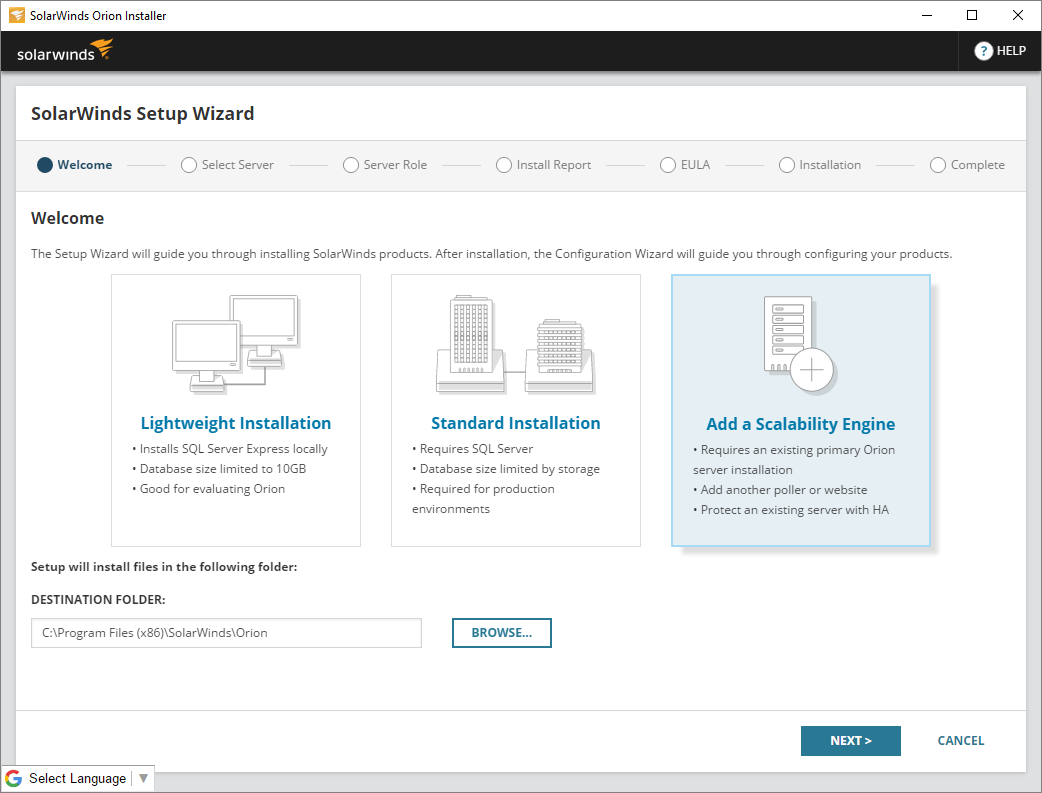
- Enter your Orion server's IP address or hostname.
- Select Additional Polling Engine for Storage Resource Monitor or Virtualization Manager and click Next.
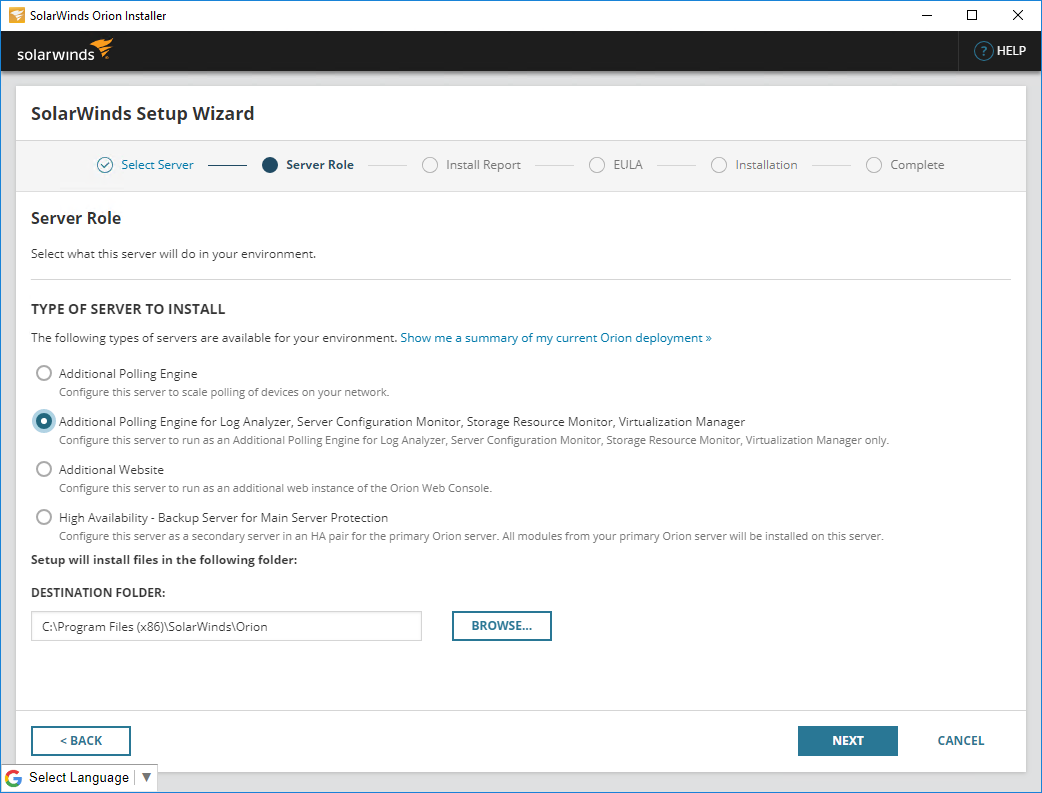
You must select Additional Polling Engine for Virtualization Manager to set up the Additional Polling Engine without requiring an additional license.
- Follow the remaining onscreen instructions to complete the installation.
For more detailed guidance on installing an Additional Polling Engine, see SolarWinds Orion Installer and Scalability Engine Guidelines.
Distribute your VMAN monitoring load to installed Additional Polling Engines
After you've installed an Additional Polling Engine, you can do two things to distribute VMAN's monitoring load to it:
- When adding a new vCenter, Hyper-V host, or standalone ESXi host, select the Additional Polling Engine in the dropdown box under Polling Engine.
- If you want to redistribute your current monitoring load, you can change the polling engine for specific nodes by going to ALL SETTINGS > Manage virtual devices > Change Polling Engine.
All nodes under a single vCenter, or Hyper-V host will always be polled by the same polling engine. Select the top-level vCenter, ESX host, or Hyper-V host to change the polling engine for all associated VMs.