
Custom Content Templates
Custom Content Templates empower users to define personalized Incident messages and description templates by utilizing the payload of a configured alert source for this service. If there is a template configured, the incoming Incident will have a customized message and description.
In the absence of user-defined templates, the system will default to using the Incident message and description templates defined by Incident Response, which is the current behavior.
Note: This feature is available only in the Premium and Enterprise plans.
Prerequisites
The User Role associated with the user in the Team must have required permissions to manage Services (ability to manage Custom Content Templates).
Create Custom Content Templates
To add a custom content template,
-
Navigate to Services -> Service Overview -> Select or search for your desired service.
-
Expand the accordion -> View Service Details.
-
In the Custom Content Templates section -> Click + Template
-
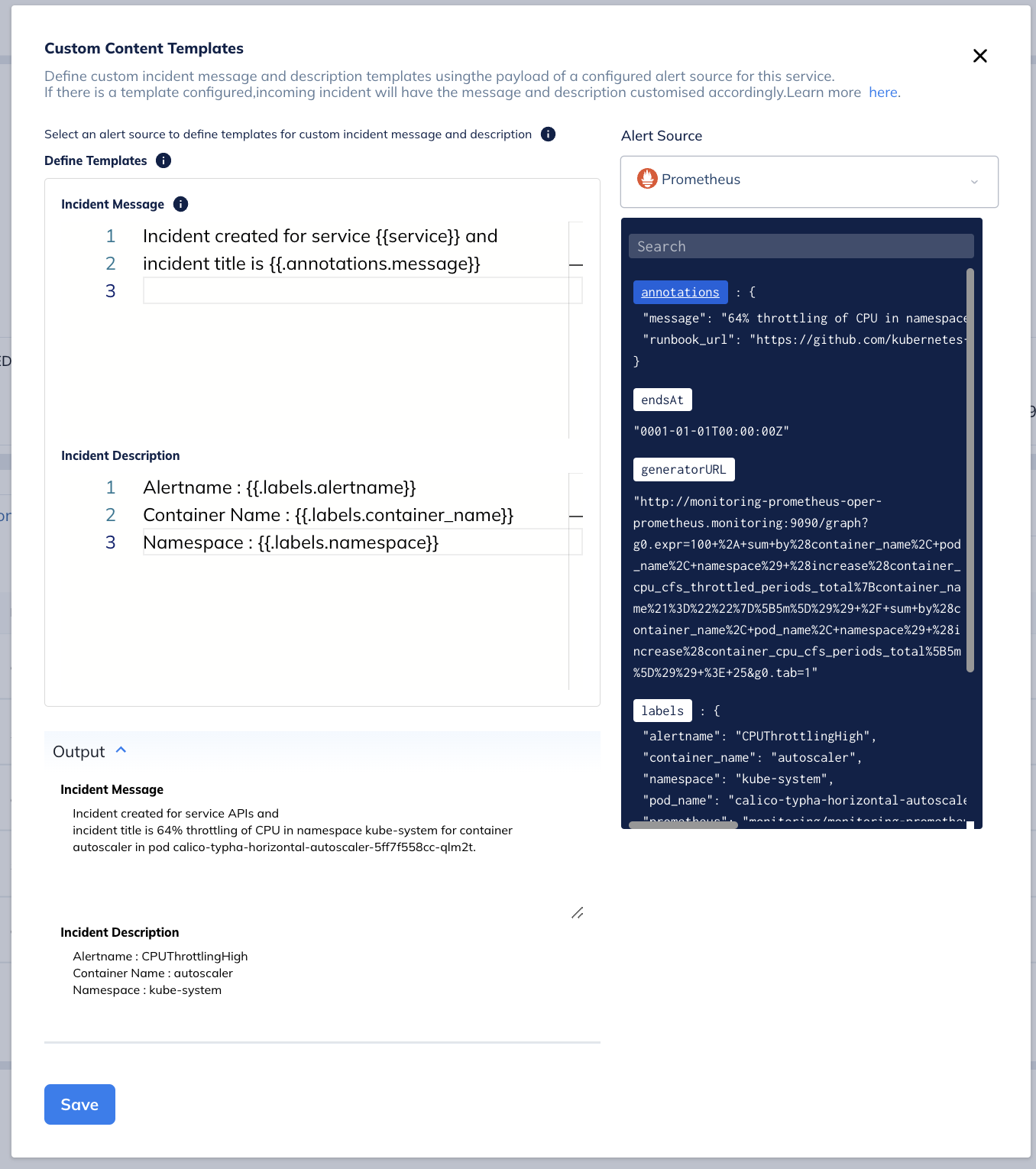
Select an Alert Source from the drop-down -> Define Templates
For additional information on how to write templates, refer Go’s standard library.
-
Establish the template for the Incident Message and Description -> Refer to the Output section to preview the appearance of your configured template.

-
Click Save.
 Regular Expression-Based Extraction in Go Template
Our system supports regular expression-based extraction using regex rules. It allows for multiple name captures but only retains the first match for a specific named group. Additionally, when the passed expression is not valid, the function returns empty match results.
{{- with $matches := ("(?m)^Container: (?P<container>.*)|Alertname: (?P<alertname>.*)|Summary: (?P<summary>.*)$" | reExtract .description) -}}
    {{$matches.container}}-{{$matches.alertname}}
{{- end -}}
This code snippet is a template written in Go's text templating language, used to parse alert descriptions. It extracts specific details like container name, alert name, and summary from the descriptions using regular expressions and presents them in a concise format.
Here's a breakdown:
- Regular Expression (
(?m)^Container: (?P<container>.*)|Alertname: (?P<alertname>.*)|Summary: (?P<summary>.*)$):(?m)enables multiline matching.^Container: (?P<container>.*)captures everything after "Container: " into a named group "container".|Alertname: (?P<alertname>.*)captures everything after "Alertname: " into a named group "alertname".|Summary: (?P<summary>.*)$captures everything after "Summary: " into a named group "summary" and ensures it matches the end of the line ($).
- Template Processing (
{{$matches := ...}}):- The code defines a variable
$matchesusing the regular expression to extract details from the description string.description.
- The code defines a variable
- Output Formatting (
{{$matches.container}}-{{$matches.alertname}})- The template accesses the captured container name (
$matches.container) and alert name ($matches.alertname) from the$matchesvariable. It combines them with a hyphen (-) for a one-line description format.
- The template accesses the captured container name (
Note: Please keep in mind that notifications for these incidents will feature the provided custom incident message and will follow applicable notification guidelines.
Delete Custom Content Templates
To delete a custom content template,
-
Click on the Custom Content Template for a selected Service.
-
On the right-hand side, click More Options -> Delete Template
-
A confirmation modal will appear -> Click Delete again to confirm. Have any questions? Ask the community.